
Most engineering teams still install GitHub Copilot as the default AI coding assistant. In 2022 that was the correct decision. In 2026 it’s a habit that’s costing you productivity.
I’ve watched three engineering teams this year pay for Copilot licenses without seriously evaluating alternatives. Every one of them was worse off than if they’d spent an afternoon testing Cursor. This isn’t an indictment of Copilot as a product — it’s a real, capable tool. It’s an indictment of Copilot’s position as the unexamined default.
Check out the best AI tools in 2026 guide covers which incumbents are still worth sticking with and which aren’t.
—Quick warning—
As of right now 30-04-2026, Github Copilot paid licenses are currently not available for individual users. And can only be bought for enterprises.
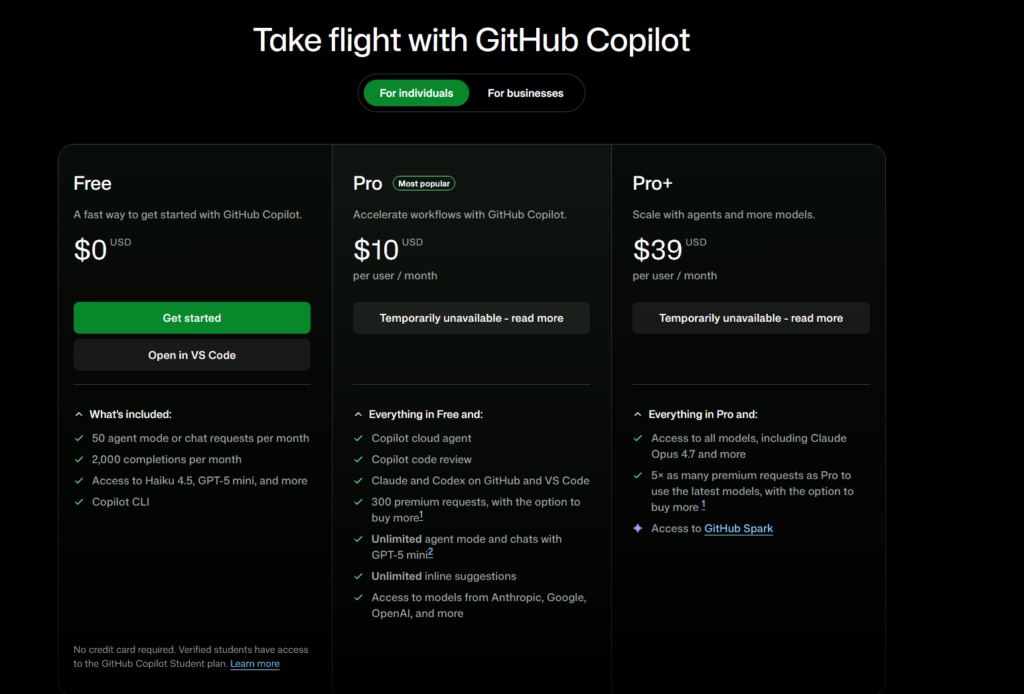
Why most teams get this wrong
The decision-making pattern I keep seeing goes roughly like this: “We’re a GitHub Enterprise shop, Copilot is built into the platform, the admin tooling is good, our security team has already reviewed it.” Someone buys licenses. Developers install the extension. Work continues.
At no point does anyone stop to ask whether Copilot is still the best tool for the actual work being done.
This made sense for two years. Before Cursor hit real maturity — somewhere around late 2024 — Copilot’s combination of autocomplete quality, IDE integration, and enterprise compliance was genuinely best-in-class. There was no obvious alternative for a team operating at scale. You’d be paying to be a beta tester.
That calculation has changed. Cursor in 2026 has crossed the “good enough for enterprise” line, and its productivity delta over Copilot is big enough that the old default doesn’t hold up to scrutiny. For a full side-by-side walkthrough, I wrote Cursor vs GitHub Copilot.
The evidence
Three specific things Copilot does notably worse than Cursor in daily use.
Multi-file refactoring. Copilot’s tab completion is still fundamentally file-scoped. Ask it to refactor a pattern across six files and you’re doing the coordination yourself. Cursor’s Agent mode reads the whole codebase, plans the edit, executes across files, and runs the tests. I’ve personally saved about 4-6 hours per month on migrations alone since moving to Cursor in February.
Model choice. Copilot uses OpenAI models. That’s it. If GPT-5 is having a bad day for a specific kind of reasoning — and frontier models do have quality regressions — you have no recourse. Cursor lets you pick between Claude Sonnet 4.6, Opus 4.7, and GPT-5 depending on the task. On complex architectural questions involving distributed systems, Opus 4.7 is measurably better than GPT-5 in my testing, and I can switch models with two clicks. The Claude 2026 guide explains the gap between current Claude versions in more detail.
Context window utilization. Copilot’s indexing is still weak at handling large monorepos with nuanced understanding. In practice, Copilot completions on a 500K-line codebase feel roughly the same as completions on a 5K-line codebase — the broader context isn’t reaching the model. Cursor’s handling of large codebases isn’t perfect but it’s meaningfully better. You can tell the difference within a day of using both.
I also wrote a longer dedicated piece on Cursor’s approach if you want the deeper dive on why that Agent mode feature is the most consequential dev tool I’ve used in years.
The strongest counter-argument
Here’s the honest steelman for sticking with Copilot. I want to be fair to it.
Enterprise compliance and admin tooling is genuinely strong. If your organization has a strict security review process, Copilot’s GitHub-Enterprise integration, audit logs, data residency options, and IP indemnification have been hardened over four years of enterprise sales cycles. Cursor has been catching up on the admin side but it hasn’t been operating at that scale for nearly as long.
IDE breadth. Copilot runs in VS Code, every JetBrains IDE, Vim, Neovim, Xcode, Eclipse, Azure Data Studio, and Visual Studio. Cursor runs in Cursor (which is a VS Code fork). If your team can’t standardize on VS Code — because you have Java developers on IntelliJ or iOS developers on Xcode — Cursor literally doesn’t work for those developers.
IP risk story. GitHub’s public-code reference filter and Copilot’s IP indemnification (for Business and Enterprise tiers) gives legal teams something Cursor hasn’t fully matched. If your company has ever been sued over code provenance, that matters.
These are real reasons. For organizations where any of them are binding, Copilot is still the right answer. I don’t think that’s most organizations.
Where the nuance lives
Not every developer benefits from Cursor’s advantages equally. Here’s who actually loses least by sticking with Copilot:
- CRUD-heavy web development where tasks are mostly additive and rarely involve complex refactoring
- Junior developers who benefit more from line-level autocomplete than from agent delegation (the mental model of Agent mode is more useful for senior engineers who can articulate complex goals)
- Mixed-IDE teams where standardizing on Cursor isn’t a realistic option
And here’s who gets hurt most by staying on Copilot:
- Senior engineers doing complex refactoring or migration work. The Agent mode productivity gain is largest for this group.
- Small-to-mid teams working on a single codebase where everyone can standardize on one tool.
- Any developer shipping features that span multiple files with real architectural coordination.
What to actually do about it
Do the test. Seriously. Spend two hours with Cursor using your actual codebase, not a demo project. Give it a real task — a small refactor, a multi-file bug fix, whatever’s actually in your backlog — and see whether it reaches the answer faster or slower than your current Copilot flow.
For most teams that run this test honestly, Cursor wins. Not by a little. By enough to pay back the $20/month Pro plan within the first week of regular use.
For the teams where Copilot wins the test, great — you’ve now validated your choice rather than defaulting to it. That’s worth doing.
If you’re not going to run the test, at least don’t pretend you’ve evaluated. The “we looked at it and Copilot is fine” conversation in 2026 is mostly a way to avoid the small but real friction of trying something new. I’d rather your team pay for Copilot as a considered choice than as an unexamined one.
The broader pattern
This isn’t unique to coding tools. In every AI category — writing, design, agents, automation — the early leader that captured market share in 2022-2024 isn’t necessarily the right answer in 2026. The space is moving fast enough that any tool that became “the default” two years ago deserves a fresh evaluation.
GitHub Copilot is a good product. It’s just no longer the obvious choice for most teams, and acting like it is means leaving real productivity on the table. That’s the part that should bother you.